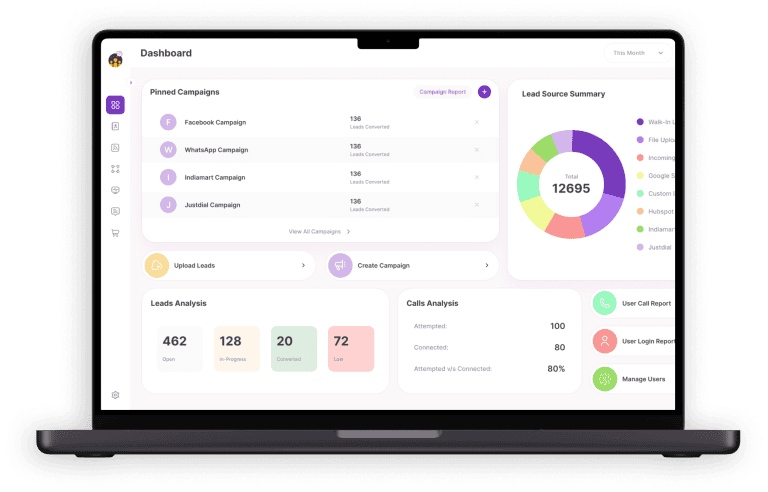





Managing sales leads and customer information in Excel may seem easy at first. However, it becomes hard as your business grows. Spreadsheets can lead to missed follow-ups, duplicate entries, and limited visibility into your sales pipeline. Relying solely on Excel slows down your sales team and affects overall efficiency.
Migrating to CRM software is the solution to these problems. NeoDove helps businesses transition from Excel smoothly, automating sales tasks, tracking deals, and improving customer engagement. With organized lead management and real-time insights, your sales team can work smarter, boost conversion rates, and drive better results.
Why Excel Falls Short for Sales and Customer Management
Excel works well for basic data storage, but it lacks the features needed for active sales and lead management.
Some common limitations include:
- No real-time lead stage tracking
- No automated follow-ups
- No call tracking or call management app
- Manual data entry errors
- No sales pipeline report visibility
As your business grows, these gaps directly impact sales and revenue. Sales teams struggle to prioritize leads, and managers have no clear view of performance.
How CRM Software Solves These Challenges
Unlike spreadsheets, CRM software is built to manage relationships, not just data.
A good CRM helps with:
- Contact management with full customer profiles
- Call tracking and call recording
- Automated lead assignment to the sales team
- Deal tracking across every sales stage
- Marketing automation for follow-ups and reminders
With platforms like NeoDove, businesses can make customer communication faster and more personal.
How Should You Prepare Your Excel Data Before Migration?
Before importing anything into CRM software, preparation is key.
Clean and Organize Your Spreadsheet Data
Start by removing:
- Duplicate entries – Remove repeated records to avoid confusion and errors during migration.
- Incomplete records – Fill in or delete entries missing key information like phone numbers or email addresses.
- Outdated leads – Eliminate old or inactive leads that are unlikely to convert to keep your CRM data relevant.
Make sure important fields such as full name, phone number, email ID, and lead source are consistent.
Define Lead Stages Clearly
In Excel, lead stages are often unclear or missing. Before migration, define stages like:
- New lead – A freshly added lead that hasn’t been contacted yet.
- Contacted – Leads that your sales team has reached out to at least once.
- Follow-up – Leads that require additional communication or reminders to move forward.
- Interested – Leads showing genuine interest in your product or service.
- Closed – Leads that successfully converted into customers or deals.
This helps CRM software map leads correctly and create accurate sales pipeline reports.
How Choose the Right CRM Software for Your Business
Not all CRM tools work the same way. Choosing the right one ensures a smooth transition from Excel.
Look for CRM software that offers:
- Easy Excel import
- Sales automation features
- Call management functionality
- WhatsApp integration
- Clear dashboards for conversion rate tracking
NeoDove CRM is built for sales-driven teams that rely heavily on calling and follow-ups. It simplifies lead generation workflows while improving team productivity.
Step-by-Step Process to Migrate from Excel to CRM Software
Migrating from Excel to CRM software can be simple if you follow a structured approach. These steps help ensure your data is accurate, workflows are ready, and your sales team can start using the CRM efficiently.
Step 1: Create Your CRM Account and Settings
Set up your CRM software by defining:
- Sales team roles
- Lead stages
- Call tracking preferences
- Follow-up rules
This ensures your CRM is ready before data import.
Step 2: Map Excel Fields to CRM Fields
Match Excel columns to CRM fields like:
- Full name → Contact name
- Phone number → Primary contact
- Lead stage → Sales stage
Most CRM software allows custom field mapping, which avoids data loss.
Step 3: Import Data in Small Batches
Instead of uploading everything at once:
- Import data in smaller chunks
- Verify accuracy after each import
- Fix errors early
This makes the migration safer and easier to manage
Step 4: Test Sales and Call Workflows
Once data is imported:
- Make test calls
- Check call tracking accuracy
- Verify deal tracking and follow-up reminders
NeoDove allows teams to test calling workflows quickly using its built-in call management app.
Training Your Sales Team After Migration
Even the best CRM software fails without proper adoption.
- Focus on Practical Training
- Train your sales team on:
- Updating lead stages
- Logging calls automatically
- Using sales automation features
- Viewing sales pipeline reports
When teams see how CRM simplifies their work, adoption becomes faster.
Using Automation to Replace Manual Excel Tasks
One major benefit of CRM software is automation.
With sales automation, you can:
- Auto-assign leads
- Set follow-up reminders
- Track every call automatically
- Monitor conversion rates in real time
NeoDove helps teams reduce manual effort while improving customer engagement through timely follow-ups.
Measuring Sales Growth After Migration
Once you move from Excel to CRM software, tracking performance becomes easier.
Key metrics to monitor:
- Conversion rate
- Sales and revenue growth
- Lead response time
- Customer retention rate
Clear reports help managers take data-driven decisions instead of guessing from spreadsheets.
Top 5 Common Mistakes to Avoid During Migration
Avoid these mistakes:
- Migrating unclean Excel data
- Skipping sales team training
- Choosing CRM software without call tracking
- Ignoring automation features
- Planning properly ensures long-term success.
Conclusion
NeoDove helps businesses move from Excel to CRM software without complexity or data loss. It simplifies lead management, call tracking, and follow-ups for better sales control.
Sales teams gain clear visibility into every stage of the sales pipeline and work more efficiently. With automation and integrated communication, customer engagement improves naturally. Choosing the right CRM software, like NeoDove, supports consistent growth and higher conversion rates.
FAQ’s
1. How to switch from Excel to CRM software?
To switch from Excel to CRM software, start by cleaning and organizing your data—remove duplicates, complete missing fields, and define lead stages. Then, use the CRM’s import tool to map fields correctly and migrate your leads smoothly.
2. How does NeoDove make migrating from Excel easier?
NeoDove allows businesses to import Excel data in a few simple steps, map lead fields, and ensure no data is lost. Its user-friendly interface makes the transition smooth for sales teams of any size.
3. Can CRM software track calls and follow-ups better than Excel?
Yes. A CRM logs calls automatically, sets follow-up reminders, and tracks lead progress—features Excel cannot handle efficiently.
4. What is the use of migrating from Excel to CRM software?
Migrating from Excel to CRM software helps automate lead management, track calls and follow-ups, improve customer engagement, and provide real-time insights into the sales pipeline.
5. Why is NeoDove CRM a good fit for small sales teams?
NeoDove CRM is ideal for small sales teams because it automates lead management, tracks calls, schedules follow-ups, and provides easy-to-read sales reports—helping smaller teams stay organized, save time, and close more deals efficiently.