
























Join our WhatsApp Channel for the latest updates.
Table of Contents
ToggleLet’s be real, in the digital space, businesses can’t afford to overlook the power of social media, especially a platform as visually powerful as Instagram. With millions of active users scrolling through their feeds daily, the opportunity to amplify your brand’s reach through strategic reposting is immense. But how to repost an Instagram post effectively without compromising your professional image?
The art of repost Instagram story isn’t just about mindlessly sharing content, it’s about curating an effective and engaging experience for your audience. From repost a caption for Instagram that resonates with your brand’s voice to mastering the art of resharing Instagram stories, every element plays a crucial role.
In this guide, we’ll explore the intricacies of how to repost an Instagram post while maintaining a professional and authentic tone. Let’s get started.
Today, businesses can’t afford to sleep on the power of user-generated content and industry insights. If you intelligently reshare Instagram story and post, you will not just amplify your brand’s reach – you’re tapping into a goldmine of opportunities.
While increased brand exposure and community engagement are well-known advantages of resharing, an often-overlooked benefit is the ability to foster unwavering brand loyalty. By consistently showcasing user-generated content, you’re not only recognizing your customers’ contributions but also solidifying their emotional connection to your brand.
Conventional social media marketing wisdom might suggest resharing content from industry leaders or influencers to reach new audiences. However, a strategic approach involves resharing posts and stories from niche communities or micro-influencers within your target market.
In a crowded market, it’s essential to stay one step ahead of your competitors. By resharing content from industry thought leaders and analysing engagement metrics, you can gain valuable insights into emerging trends, consumer preferences, and effective marketing strategies.
In an era where consumers crave transparency and authenticity, resharing user-generated content can be a powerful differentiator. By showcasing the genuine experiences and perspectives of your customers, you’re building a sense of trust and credibility that traditional marketing methods often struggle to achieve.
Repost Instagram story can be a powerful tool for businesses, but it’s crucial to approach it strategically to avoid potential pitfalls. While resharing Instagram stories can boost engagement and reach, there are certain practices to be crystal clear of.
Let’s delve into the dos and don’ts of effective reposting, ensuring you craft the perfect repost caption for Instagram without compromising your brand’s integrity.
1) Failing to obtain proper permissions or neglecting to credit the original creator can land you in legal hot water and damage your brand’s reputation.
2) Indiscriminate reposting without considering your audience’s interests or the content’s quality can dilute your brand’s message and alienate followers.
3) Reposting content that clashes with your brand’s tone, values, or visual identity can create a disjointed and confusing experience for your audience.
4) While resharing valuable content is encouraged, overdoing it can make your feed appear unoriginal and undermine your brand’s authenticity.
5) Reposting without providing necessary context or demonstrating the content’s relevance to your brand can leave your audience puzzled and disengaged.
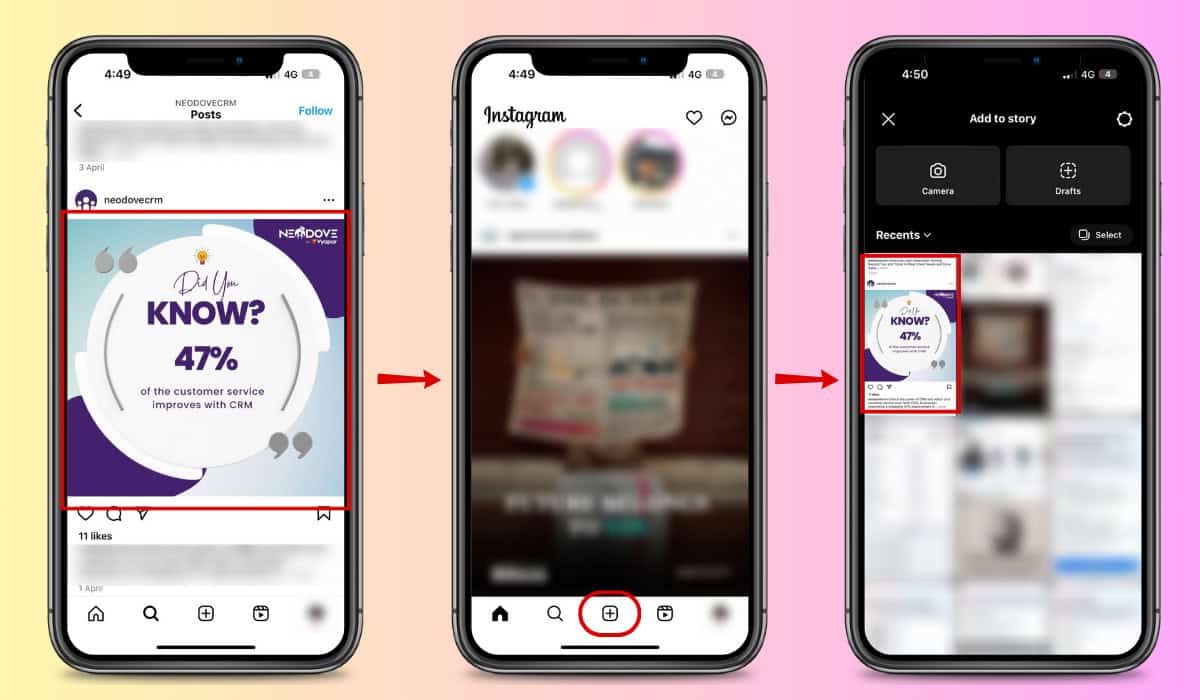
Instagram allows you to repost Instagram story, even of others, to your own Instagram story. When it comes to the actual reposting process, don’t be afraid to explore third-party apps or Instagram’s native features. These tools can streamline the process, ensuring proper attribution and copyright compliance, while also allowing you to add your own creative flair.
Find the Instagram post you want to repost and take a screenshot of it.
Open the Instagram app and tap the “+” icon in the top right corner or in the bottom centre to create a new post.
Select the screenshot you took and resize it as needed.
Add any desired edits, filters, or captions. Be sure to give credit to the original poster by tagging them or including their username in the caption.
If reposting to your Instagram Story, tap “Add to Your Story” and make any additional edits before posting.
Mastering how to repost an Instagram post is a powerful strategy for businesses to boost their reach and engagement. If you figuring out how to share a post on Instagram to my feed, effective reposting goes beyond just sharing content. It’s about curating an authentic, on-brand experience that resonates with your audience.
By adhering to best practices, respecting intellectual property, and delivering value, you can leverage the full potential of reposting. Embrace this opportunity to showcase your brand’s personality, tap into new audiences, and forge deeper connections through the strategic art of reposting on Instagram.

100% Lead Capture, 75% More Efficiency, 2X Engagement!
Book a free demo and see how you can close more deals, faster!


95% business who use NeoDove report 3x more profits!
Happy Customers
107k reviews


Book a free demo and see how you can close more deals, faster!

![]()
95% business who use NeoDove report 3x more profits!
Happy Customers
107k reviews

These outcomes and beyond can be yours.
Lead Leakage
Increase in call attempts
More Engagement